jQuery to move bootstrap rows up/down
Had the need to create a nice UX (user experience) by moving a boostrap “div” up and down within a bootstrap “row” collection on a website. Always love sharing some elegant code, so check out this jsFiddle to see it…
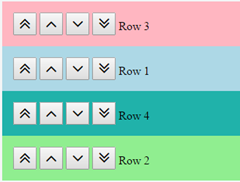 Had the need to create a nice UX (user experience) by moving a boostrap “div” up and down within a bootstrap “row” collection on a website.
Always love sharing some elegant code, so check out this jsFiddle to see it working…
https://jsfiddle.net/lancelarsen/814rteua/
https://jsfiddle.net/lancelarsen/w4fob4pv/ (variant for nested bootstrap divs)
JavaScript (requires jQuery)
$(".moveup").on("click", function() {
    var elem = $(this).closest("div");
    elem.prev().before(elem);
});

$(".movedown").on("click", function() {
    var elem = $(this).closest("div");
    elem.next().after(elem);
});

$(".movetop").on("click", function() {
    var elem = $(this).closest("div");
    elem.siblings().first().before(elem);
});

$(".movebottom").on("click", function() {
    var elem = $(this).closest("div");
    elem.siblings().last().after(elem);
});
CSS
.updownrow {
    padding: 15px;
}

.updownbtn {
    font-size: 25px;
}
HTML (requires Font Awesome – https://fortawesome.github.io/Font-Awesome/)
<div class="row">
    <div class="col-sm-12 updownrow" style="background: lightblue;">
        <button type="button" class="updownbtn movetop fa fa-angle-double-up"></button>
        <button type="button" class="updownbtn moveup fa fa-angle-up"></button>
        <button type="button" class="updownbtn movedown fa fa-angle-down"></button>
        <button type="button" class="updownbtn movebottom fa fa-angle-double-down"></button>
        Row 1
    </div>
    <div class="col-sm-12 updownrow" style="background: lightgreen;">
        <button type="button" class="updownbtn movetop fa fa-angle-double-up"></button>
        <button type="button" class="updownbtn moveup fa fa-angle-up"></button>
        <button type="button" class="updownbtn movedown fa fa-angle-down"></button>
        <button type="button" class="updownbtn movebottom fa fa-angle-double-down"></button>
        Row 2
    </div>
    <div class="col-sm-12 updownrow" style="background: lightpink;">
        <button type="button" class="updownbtn movetop fa fa-angle-double-up"></button>
        <button type="button" class="updownbtn moveup fa fa-angle-up"></button>
        <button type="button" class="updownbtn movedown fa fa-angle-down"></button>
        <button type="button" class="updownbtn movebottom fa fa-angle-double-down"></button>
        Row 3
    </div>
    <div class="col-sm-12 updownrow" style="background: lightseagreen;">
        <button type="button" class="updownbtn movetop fa fa-angle-double-up"></button>
        <button type="button" class="updownbtn moveup fa fa-angle-up"></button>
        <button type="button" class="updownbtn movedown fa fa-angle-down"></button>
        <button type="button" class="updownbtn movebottom fa fa-angle-double-down"></button>
        Row 4
    </div>
</div>